

Running a one-person business means handling marketing, sales, customer communication, administration, and service delivery, often without a dedicated team. You might spend hours responding to inquiries, preparing proposals, scheduling appointments, creating content, and following up with potential customers. These repetitive responsibilities can leave little time for the activities that actually move your business forward.
AI automation for solopreneurs offers a practical way to simplify repetitive tasks, organize business processes, improve customer communication, and build a more efficient one-person business. By combining artificial intelligence (AI) with workflow automation, freelancers, consultants, coaches, creators, and small business owners can reduce manual work without immediately hiring additional employees.
However, automation is not a magic solution. It cannot guarantee more sales, fix a weak marketing strategy, or replace every human decision. The real opportunity is to identify repetitive tasks, implement reliable workflows, and measure whether they improve your business.
In this complete guide, you will learn how AI automation works, which tools may be useful, how to automate lead generation and follow-ups, what automation costs, and when professional digital marketing or automation support may be worthwhile.
What Is AI Automation for Solopreneurs?
AI automation combines artificial intelligence with software workflows to perform or assist with repetitive business activities.
Artificial intelligence can interpret text, summarize information, classify inquiries, generate drafts, and help analyze business data. Automation software connects applications and performs predefined actions when specific events occur.
For example, imagine that a potential customer submits an inquiry through your website.
A basic automated workflow might save the customer’s details in a spreadsheet and notify you by email. An AI-powered workflow could also categorize the inquiry, summarize the customer’s requirements, and prepare a personalized follow-up message for your review.
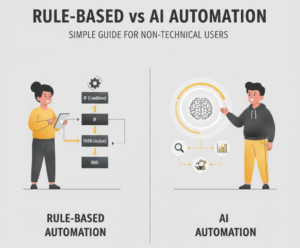
Rule-Based Automation vs. AI Automation
Rule-based automation follows predefined instructions. For example, when someone books a consultation, the system automatically sends a confirmation email.
AI-powered automation uses artificial intelligence to interpret information or generate content within a workflow. For example, it might classify incoming messages as sales inquiries, support requests, or billing questions.
AI agents are systems that can use AI models and connected tools to work through multiple steps toward a defined goal. Depending on their configuration, they may retrieve information, select permitted actions, and execute tasks. They still require suitable permissions, monitoring, and human oversight.
Common examples include:
- Automatically recording website inquiries in a CRM.
- Using AI to draft personalized follow-up emails.
- Generating social media content from approved blog articles.
- Sending appointment confirmations and reminders.
- Summarizing weekly marketing performance.
- Organizing customer questions and preparing support responses.
For most solopreneurs, a simple, reliable workflow is a better starting point than a complicated AI agent.
Why Solopreneurs Need AI Automation

Solopreneurs face a unique challenge: business responsibilities can increase, but the number of working hours remains limited.
AI automation can help address several common problems.
1. Limited Working Hours
Administrative work can consume valuable time that could otherwise be spent serving clients, improving products, or developing the business.
Automating repetitive tasks may reduce manual effort and create more time for higher-value activities.
2. Inconsistent Marketing
A freelancer might publish several social media posts one week and nothing the following week.
A workflow that organizes content ideas, prepares drafts, and schedules approved posts can make marketing more consistent.
3. Missed Lead Follow-Ups
Potential customers may request information while you are busy with other projects.
An automated system can record the inquiry, create a follow-up task, and send an appropriate acknowledgment, reducing the likelihood of losing track of potential opportunities.
4. Slow Customer Responses
Automated acknowledgments and approved FAQ responses can help customers receive basic information more quickly.
However, sensitive complaints, disputes, refunds, and complex questions should be handled by a human when necessary.
5. Manual Reporting
Collecting information from website analytics, advertising dashboards, spreadsheets, and CRM systems can become time-consuming.
Automation can help consolidate available metrics into a regular report. Human judgment is still needed to interpret the numbers and decide what action to take.
6. Difficulties Scaling Service Delivery
Client onboarding, document collection, project updates, and handovers often involve repeatable steps.
Standardizing these processes can help a one-person business handle work more consistently without compromising service quality.
The goal is not to automate everything. It is to eliminate unnecessary repetition while protecting accuracy, customer trust, and business quality.
What Tasks Can a Solopreneur Automate With AI?
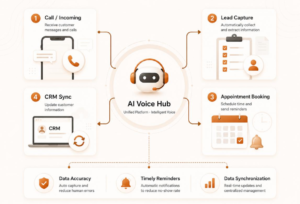
Many recurring business tasks can be partially automated. The right approach depends on how frequently the task occurs, how predictable it is, and what happens if something goes wrong.
Content Research and Drafting
AI tools can help organize ideas, summarize supplied sources, develop article outlines, and prepare first drafts.
The benefit is faster preparation and a more organized content process.
The limitation is that AI-generated information can be inaccurate. Verify facts, statistics, quotations, and product claims before publishing.
Social Media Planning
AI can transform approved topics into draft captions, content calendars, and platform-specific variations.
This can make content preparation more consistent.
Human review is necessary to maintain brand voice, verify claims, and avoid repetitive or unsuitable content.
Email Marketing
Email marketing platforms can organize subscribers, send welcome emails, and deliver scheduled campaigns.
Automation can improve communication consistency, but businesses must follow applicable consent, unsubscribe, privacy, and email-sending requirements.
Lead Capture and Qualification
Website forms can automatically send inquiries to a CRM or lead database.
AI may assist with categorizing inquiries according to their stated requirements, timeline, or requested service.
However, automated classifications can be wrong. Review uncertain or important decisions before acting on them.
Appointment Scheduling
Scheduling tools can display availability, collect booking information, and send confirmations.
This reduces the need for repeated scheduling messages.
Always test calendar synchronization, time zones, cancellations, and rescheduling.
Customer FAQs
AI-assisted support systems can retrieve approved answers to common questions.
They can reduce repetitive responses when the knowledge base is accurate and up to date.
Questions involving sensitive information, disputes, or uncertain answers should be escalated appropriately.
CRM Updates
Automation can create contact records, update lead stages, and record interactions.
This helps maintain organized customer information.
Incorrect field mappings, duplicate records, or failed integrations can create problems, so monitoring is important.
Client Onboarding
A new client can automatically receive a welcome email, onboarding checklist, document request, and project instructions.
This creates a more consistent experience.
Review the agreed service scope, payment status, and individual client requirements before initiating the workflow.
Proposal Preparation
AI can help prepare proposal drafts using approved templates and customer requirements.
This may reduce repetitive writing.
Always verify pricing, deliverables, timelines, exclusions, and contractual commitments before sending a proposal.
Invoice Reminders
An accounting or workflow system can send reminders for verified outstanding invoices.
This helps organize collections and reduces the need for manual reminders.
Confirm payment status before sending messages to avoid contacting customers who have already paid.
Reporting and Analytics
Automation can consolidate available website, advertising, and CRM metrics into a weekly report.
This reduces manual data collection.
Verify reporting periods, totals, attribution, and currency before making decisions.
Customer Feedback Collection
A completed project can trigger a polite feedback request.
This helps businesses collect genuine feedback consistently.
Obtain appropriate permission before publishing identifiable testimonials, and never fabricate or manipulate customer reviews.
Best AI Automation Tools for Solopreneurs
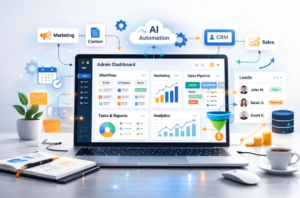
The best AI automation tools depend on your business needs, budget, existing applications, and technical experience.
Instead of choosing tools based only on popularity, identify the problem you want to solve and select the simplest solution that meets your requirements.
1. ChatGPT for Writing and Research Assistance
ChatGPT can assist with brainstorming, content outlines, email drafts, summarization, analysis, and other knowledge-based tasks.
It can be particularly useful for freelancers, consultants, content creators, and marketers.
However, AI-generated content requires appropriate fact-checking and editing. Consumer subscriptions and API usage should also be evaluated separately.
Official website: https://openai.com/chatgpt/pricing
2. Make for Visual Workflow Automation
Make provides a visual workflow builder that connects supported applications and automates processes.
It can help businesses create workflows involving forms, spreadsheets, CRMs, notifications, and other supported services.
Its official pricing page lists a free plan with usage limits and paid plans with different capabilities.
Important limitation: Complex workflows require testing, monitoring, and troubleshooting.
Official website: https://www.make.com/en/pricing
3. Zapier for Connecting Applications
Zapier helps connect supported applications through automated workflows.
For example, a new form submission can trigger a CRM update and an email notification.
Plan limits, supported actions, and AI-related task usage can affect the total cost.
Important limitation: Verify that the specific trigger and action you need are supported before building a workflow.
Official website: https://zapier.com/pricing
4. HubSpot CRM for Lead Management
HubSpot provides CRM functionality for managing contacts, tracking deals, and organizing customer interactions.
It can be useful for consultants and service providers who receive inquiries through several channels.
Free foundational tools are available, while advanced capabilities and limits vary by plan.
Important limitation: Advanced automation may require paid features or additional configuration.
Official website: https://www.hubspot.com/pricing/crm
5. Mailchimp for Email Marketing
Mailchimp offers email marketing, audience management, and plan-dependent automation features.
It may be suitable for businesses that send newsletters, educational emails, or customer follow-ups.
Important limitation: Contact limits, sending limits, feature availability, and deliverability requirements should be evaluated before selecting a plan.
Official website: https://mailchimp.com/pricing/marketing/
6. Calendly for Appointment Scheduling
Calendly helps users organize appointments through online scheduling pages and calendar integrations.
It can be useful for coaches, freelancers, consultants, and businesses that regularly arrange discovery calls.
Plan features and integration availability vary.
Official website: https://calendly.com/pricing
AI Automation Tool Comparison
| Tool or Category | Main Use | Suitable Business | Cost Considerations | Important Limitation |
|---|---|---|---|---|
| ChatGPT | Writing, brainstorming, summarization | Knowledge-based businesses | Free and paid options; API charges are separate | Can produce inaccurate information |
| Make | Visual workflow automation | Businesses connecting multiple applications | Free and paid plans; usage limits apply | Complex workflows require monitoring |
| Zapier | App-to-app automation | Beginners and small businesses | Plan and task limits affect cost | Not every action is supported |
| HubSpot CRM | Contact and deal management | Consultants and service providers | Free foundational tools; advanced features may cost extra | Features vary by plan |
| Mailchimp | Email campaigns and audience management | Creators and businesses with subscriber lists | Contact and sending limits affect pricing | Does not automatically solve consent or deliverability issues |
| Calendly | Appointment scheduling | Coaches and consultants | Free and paid plans | Advanced features may require an upgrade |
| Forms and spreadsheets | Basic lead capture and tracking | New businesses with low inquiry volume | May use existing or free tools | Manual cleanup may be necessary |
| Customer support platforms | Ticketing and FAQ automation | Businesses with recurring support questions | Depends on volume and features | AI responses need safeguards |
Tool pricing, features, and availability can change. Check the official websites before purchasing or publishing specific price claims.
How to Choose the Right AI Automation Tools
Follow these steps before investing in new software:
- Identify the exact business problem.
- Check whether your existing tools already solve it.
- Select the simplest workflow that meets your needs.
- Estimate subscription, usage, and maintenance costs.
- Test the workflow using sample data.
- Measure reliability and operational value.
- Upgrade only when a genuine limitation justifies the expense.
Native integrations are built directly into applications. Third-party integrations connect supported applications through an external platform. Custom integrations may require APIs, webhooks, code, or specialist implementation.
Never assume that two applications can exchange every field or perform every action simply because they appear in the same integration directory.
10 Practical AI Automation Workflows for Solopreneurs
The following workflows are practical implementation examples. They are not claims of guaranteed savings, conversions, or revenue.
Workflow 1: Website Visitor to Qualified Lead
Business problem: Website visitors explore your services but do not know what to do next.
Trigger: A visitor submits an inquiry or consultation form.
Automation steps:
- Collect the visitor’s contact details, business type, and stated requirements.
- Save the submission in a CRM.
- Categorize the inquiry using predefined rules or AI-assisted classification.
- Send an acknowledgment explaining the next step.
- Create a follow-up task for the business owner.
- Offer a relevant booking link when appropriate.
Tools required: Website form, CRM, workflow automation platform, and optional AI classification.
Expected operational benefit: A more organized inquiry process and fewer missed records.
Human review: Verify the prospect’s requirements before deciding whether the lead is qualified.
Workflow 2: Lead Form to CRM and Notification
Business problem: Inquiries remain scattered across email inboxes and spreadsheets.
Trigger: A new form submission arrives.
Automation steps:
- Validate the required fields.
- Check for duplicate contacts.
- Create or update the CRM record.
- Record the inquiry source when available.
- Notify the business owner.
- Log failures and retry safely where appropriate.
Tools required: Form builder, CRM or spreadsheet, and integration platform.
Expected operational benefit: More consistent lead organization and less manual data entry.
Human review: Test duplicate handling and restrict access to customer information.
Workflow 3: Lead Capture to Personalized Follow-Up
Business problem: Potential customers receive generic responses or no follow-up.
Trigger: A new inquiry is recorded.
Automation steps:
- Identify the service requested.
- Retrieve an approved email template.
- Use AI to draft a personalized message based on genuine inquiry details.
- Send an appropriate acknowledgment or queue the draft for approval.
- Create a follow-up task when necessary.
- Stop the sequence when the prospect responds, opts out, or becomes a customer.
Tools required: CRM, email platform, and optional AI writing assistant.
Expected operational benefit: More consistent communication with less repetitive writing.
Human review: Verify personalization, promises, recipient details, consent, and follow-up timing.
Workflow 4: Appointment Booking and Reminders
Business problem: Scheduling meetings requires repeated messages and manual coordination.
Trigger: A prospect books an appointment.
Automation steps:
- Add the event to the connected calendar.
- Send a confirmation with meeting details and time zone.
- Send appropriate reminders.
- Provide a rescheduling option.
- Update the CRM after the meeting.
Tools required: Scheduling platform, calendar, email, and CRM.
Expected operational benefit: Less administrative coordination.
Human review: Test calendar conflicts, cancellations, time zones, and rescheduling.
Workflow 5: Content Idea to Reviewed Social Media Draft
Business problem: Content creation becomes inconsistent because every post starts from scratch.
Trigger: An approved topic is added to a content database.
Automation steps:
- Retrieve the topic, audience, and key message.
- Generate draft variations for selected platforms.
- Prepare a suggested hook, caption, and call to action.
- Store the drafts for review.
- Notify the owner for approval.
- Schedule or publish only after approval.
Tools required: AI writing assistant, content database, workflow platform, and supported scheduling tool.
Expected operational benefit: A repeatable content preparation process.
Human review: Verify facts, originality, brand voice, copyright considerations, and platform formatting.
Workflow 6: Blog Publication to Content Distribution
Business problem: A published blog receives little additional promotion.
Trigger: A new article is published.
Automation steps:
- Detect the published article through a supported integration or feed.
- Retrieve its title, URL, and summary.
- Generate draft social posts and an email introduction.
- Store the drafts for editorial review.
- Schedule approved content.
- Track referral traffic where measurement is available.
Tools required: Website or RSS feed, AI assistant, content workflow, and analytics.
Expected operational benefit: Better reuse of existing content.
Human review: Confirm that every post accurately represents the article and contains working links.
Workflow 7: New Customer to Onboarding
Business problem: Every new client receives different instructions or experiences unnecessary delays.
Trigger: A deal is marked as won or a payment is confirmed.
Automation steps:
- Confirm the customer and agreed service.
- Send a welcome email.
- Provide an onboarding checklist.
- Request only the necessary documents.
- Create project tasks and deadlines.
- Notify the owner when required information is missing.
Tools required: CRM, project management platform, email, and approved payment-status data.
Expected operational benefit: More consistent onboarding.
Human review: Confirm the service scope, payment status, privacy permissions, and client requirements.
Workflow 8: Customer Question to Support Response
Business problem: The same basic questions arrive repeatedly.
Trigger: A customer sends a question through an approved support channel.
Automation steps:
- Identify the question category.
- Search an approved FAQ or knowledge base.
- Prepare an answer based on the available information.
- Send only responses that satisfy appropriate confidence and policy rules, or queue them for approval.
- Escalate uncertain or sensitive requests.
- Record the interaction.
Tools required: Support inbox, knowledge base, AI assistant, and optional ticketing system.
Expected operational benefit: Faster handling of routine questions.
Human review: Monitor incorrect answers, update outdated documentation, and provide a clear escalation route.
Workflow 9: Completed Project to Testimonial Request
Business problem: Customers complete projects without being invited to share feedback.
Trigger: A project is marked complete.
Automation steps:
- Confirm that the project is complete.
- Send a polite feedback request.
- Provide a simple response form.
- Record feedback and any permission to publish it.
- Notify the owner when feedback arrives.
Tools required: Project management system, email, and feedback form.
Expected operational benefit: More consistent feedback collection.
Human review: Obtain appropriate permission before publishing identifiable testimonials. Never fabricate or pressure customers into providing positive reviews.
Workflow 10: Weekly Business Performance Report
Business problem: Business owners cannot easily understand performance across marketing and sales.
Trigger: A scheduled weekly reporting event.
Automation steps:
- Retrieve available website, advertising, CRM, and sales metrics.
- Check reporting periods and data completeness.
- Calculate changes using consistent definitions.
- Ask AI to summarize patterns and possible explanations.
- Produce a report with links to the original data.
- Highlight anomalies that require investigation.
Tools required: Analytics, advertising dashboards, CRM, spreadsheet, and optional AI summarization.
Expected operational benefit: Less time spent collecting information and more time available for analysis.
Human review: Verify totals, attribution, currency, and dates. Treat AI-generated explanations as hypotheses rather than proven causes.
How to Automate Lead Generation With AI
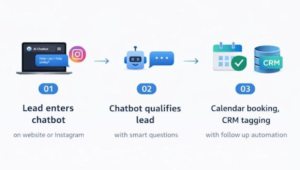
Lead generation is not simply about collecting more names. The objective is to attract suitable prospects, understand their needs, and guide them toward an appropriate next step.
A practical lead-generation funnel looks like this:
Traffic → Landing Page → Lead Capture → Qualification → Follow-Up → Consultation → Proposal → Sale
Step 1: Attract Relevant Traffic
Use SEO content, useful resources, social media, partnerships, or paid advertising to reach people who may need your services.
For example, an independent business consultant could publish an article about automating client onboarding and offer a downloadable checklist.
Your content should answer the reader’s question before asking them to purchase anything.
Step 2: Create a Clear Landing Page
A landing page should explain:
- Who the service is for.
- Which problem it addresses.
- What the visitor receives.
- What happens after submitting the form.
- How the visitor can contact the business.
- Where to find relevant privacy information.
Avoid unnecessary form fields. Request only information that genuinely helps you respond.
Step 3: Capture and Organize Inquiries
Connect the form to a CRM or structured lead database.
Record the source, requested service, date, and relevant consent information.
Use deduplication rules to prevent repeated submissions from creating unnecessary records or messages.
Step 4: Qualify Leads Responsibly
AI can help categorize inquiries according to stated requirements, business type, timeline, and budget.
However, automated classifications can be wrong. Avoid relying exclusively on inferred characteristics for consequential decisions, and provide human review when necessary.
Step 5: Follow Up With Relevant Information
Send an acknowledgment and, where appropriate, a useful resource or consultation invitation.
Use email or messaging channels that the person has agreed to receive.
A follow-up workflow should stop when the prospect opts out or the message is no longer relevant.
Step 6: Measure the Funnel
Track metrics such as:
- Landing-page conversion rate.
- Valid lead rate.
- Qualified lead rate.
- Lead response time.
- Appointment booking rate.
- Consultation attendance rate.
- Proposal-to-sale conversion rate.
- Cost per qualified lead.
Use consistent definitions and date ranges. More inquiries do not necessarily mean better business performance if the additional leads are unsuitable.
How to Use WhatsApp Automation Responsibly
WhatsApp can be useful for customer conversations and opted-in follow-ups, particularly for service businesses in India.
Use the appropriate WhatsApp product and approved integration for the intended workflow. For the WhatsApp Business Platform, review Meta’s current messaging rules, template requirements, and opt-in expectations before implementation. Applicable laws may impose additional obligations.
Do not use purchased lists, unsolicited bulk messages, or automation designed to evade messaging restrictions. Respect opt-outs and keep consent records where required.
For many solopreneurs, a website form, CRM, and timely email follow-up are enough to get started. Add messaging automation only when there is a clear customer need and a compliant implementation path.
Want to organize your lead-generation process? Visit 2 NICE LIFE to explore digital marketing and business growth solutions that may help connect your marketing activities with a more structured inquiry and follow-up system.
How to Use AI Automation for Marketing and Sales

An effective marketing system connects multiple activities instead of automating isolated tasks.
SEO Content Marketing
AI can assist with keyword research, outlines, source summaries, and first drafts.
Human editing should ensure that articles are accurate, original, useful, and aligned with the business’s expertise.
Publishing large quantities of unreviewed AI content is not a substitute for a sound content strategy.
Social Media Marketing
Build a repeatable process for collecting ideas, drafting posts, approving content, scheduling publication, and reviewing engagement.
Automation should support your brand’s communication rather than making every post sound identical.
Paid Advertising
Automation can help consolidate campaign data, flag unusual changes, prepare reports, and support creative testing.
Advertising platforms may already provide native optimization features. Before adding a third-party automation layer, understand the available features and ensure that changes can be monitored or reversed.
Do not allow an AI workflow to make unrestricted advertising budget changes without appropriate limits and oversight.
Lead Nurturing and Sales Management
Use a CRM to record inquiries, track sales stages, create follow-up tasks, and understand why opportunities progress or stall.
AI can summarize notes and draft next-step messages, but understanding the prospect’s actual requirements remains essential.
Customer Retention
Automate appropriate onboarding messages, renewal reminders, feedback requests, and helpful educational emails.
Keep communications relevant and respect customer preferences.
Reporting and Optimization
Use a consistent reporting schedule to examine traffic, qualified leads, sales activity, and costs.
A report should help you decide what to change next. It should not merely produce attractive charts.
The central principle is simple: automating a task makes it easier to execute, while building a marketing system ensures that the task supports a clear business objective.
Automation cannot compensate for a weak offer, unsuitable audience, unclear positioning, poor landing page, or ineffective sales process.
How Much Does AI Automation Cost?
AI automation costs depend on the number of tools, monthly activity, integration complexity, data requirements, and support needs.
Free and Entry-Level Tools
Existing email, calendar, spreadsheet, CRM, and AI tools may be sufficient for a simple workflow.
However, free plans often have restrictions on usage, integrations, storage, collaboration, or automation frequency.
Paid Subscriptions
Paid plans may provide higher limits, additional integrations, advanced features, better administration, or support.
Evaluate the complete cost of the workflow instead of considering each subscription separately.
Usage-Based AI APIs
When an automation calls an AI model through an API, charges may depend on the model, input and output volume, and other metered features.
API billing is not necessarily included in a consumer AI subscription.
Integration and Implementation
Some workflows can be configured independently. More complex projects may require specialist setup, custom development, testing, security controls, documentation, and maintenance.
An Illustrative Monthly Cost Calculation
The following example uses hypothetical assumptions, not vendor quotations or a prediction of savings.
| Cost Component | Illustrative Monthly Assumption |
|---|---|
| AI writing assistant | ₹1,500 |
| Workflow automation platform | ₹1,000 |
| Email or CRM upgrade | ₹1,000 |
| Additional API usage | ₹500 |
| Total illustrative cost | ₹4,000 |
These amounts are examples only. Actual prices may be lower or higher, and taxes, currency conversion, and setup costs are excluded.
Suppose a workflow saves an assumed eight hours per month and you value your time at ₹500 per hour.
Estimated value of time saved = 8 × ₹500 = ₹4,000 per month.
This does not automatically mean the workflow is profitable. You must also account for setup and maintenance time, errors, the usefulness of the saved hours, and any additional business value.
Use this calculation as a decision aid, not a guaranteed return on investment.
Free vs. Paid AI Automation Tools
When Free Tools Are Sufficient
Start with free or existing tools when:
- You have a small number of leads.
- Your workflow has only a few steps.
- You can manage exceptions manually.
- Your existing applications support the necessary actions.
- You are testing whether a process is worth automating.
For example, a freelancer may use a form, spreadsheet, calendar, and standard email templates before paying for an integrated CRM.
When Paid Tools May Be Worthwhile
Consider paid solutions when:
- Your usage consistently exceeds free-plan limits.
- You need advanced integrations.
- Manual processing creates a meaningful bottleneck.
- You require additional administration, reporting, or support.
- Your business needs documented access controls or additional security features.
Do not purchase an expensive automation platform simply because it advertises AI agents. Choose the smallest solution that reliably addresses your actual problem.
A Step-by-Step 30-Day AI Automation Implementation Plan

A staged implementation helps reduce unnecessary spending and makes failures easier to identify.
Week 1: Audit Repetitive Tasks
List the activities you perform regularly.
Record how often each occurs, how long it takes, and what happens when the task is delayed or completed incorrectly.
Prioritize tasks that are frequent, predictable, and measurable.
Examples include copying website inquiries into a CRM, sending booking confirmations, and preparing weekly reports.
Week 2: Implement One Workflow
Choose one task and document the current process.
Define:
- The trigger.
- Required input data.
- Each action.
- Expected output.
- Error-handling procedure.
- Human approval points.
- Success metrics.
Build the simplest workable version using existing tools where possible.
Week 3: Test and Document
Test the workflow with sample data and realistic edge cases.
Check duplicate submissions, missing fields, failed connections, incorrect AI classifications, unexpected replies, and permission boundaries.
Write a short operating procedure explaining how the workflow works and how to disable it if necessary.
Week 4: Measure and Improve
Compare the workflow’s performance with the original process.
Measure:
- Time spent per task.
- Lead response time.
- Follow-up completion rate.
- Appointment booking rate.
- Qualified lead rate.
- Conversion rate.
- Error rate.
- Cost per qualified lead.
Use a baseline period and consistent definitions. Where practical, compare similar workloads instead of assuming every change resulted from automation.
AI Automation Implementation Checklist
- [ ] The business problem is clearly defined.
- [ ] The existing process is documented.
- [ ] The workflow has a clear trigger and output.
- [ ] The selected tools support the required actions.
- [ ] Access permissions are appropriate.
- [ ] Customer data is handled responsibly.
- [ ] Error alerts and recovery steps are defined.
- [ ] AI-generated output has appropriate review.
- [ ] Performance is measured against a baseline.
- [ ] Subscription and usage costs are monitored.
- [ ] The workflow can be paused or disabled.
- [ ] Someone is responsible for maintenance.
Once the first workflow operates reliably, consider automating the next bottleneck. Expanding gradually is usually easier to manage than connecting every business application at once.
Common AI Automation Mistakes to Avoid
1. Automating a Broken Process
Problem: An inefficient process becomes faster but remains inefficient.
Solution: Simplify the process manually before building automation around it.
2. Buying Too Many Tools
Problem: Overlapping subscriptions create complexity and unexpected costs.
Solution: Audit existing tools and add new products only when a specific capability is missing.
3. Publishing Unreviewed AI Content
Problem: Inaccurate claims, repetitive writing, and generic advice can damage trust.
Solution: Verify facts, add original analysis, and edit for your audience.
4. Sending Generic Follow-Ups
Problem: Automated messages may feel irrelevant or intrusive.
Solution: Base messages on genuine inquiry details and send them only when appropriate.
5. Ignoring Consent
Problem: Unwanted messages can damage customer trust and violate applicable rules.
Solution: Record consent where required, follow channel policies, and respect opt-outs.
6. Exposing Confidential Information
Problem: Customer records or business documents may be shared with tools without appropriate authorization.
Solution: Review provider data practices, access controls, retention settings, contractual requirements, and applicable law before connecting sensitive information.
7. Failing to Monitor Integrations
Problem: Expired credentials, API changes, and usage limits can interrupt workflows.
Solution: Configure error notifications, inspect execution logs, and test recovery procedures.
8. Over-Automating Customer Relationships
Problem: Customers may need empathy, judgment, or a tailored explanation.
Solution: Make human assistance easy to reach and reserve sensitive conversations for people.
9. Ignoring Usage Costs
Problem: Frequent workflow runs and AI calls can increase expenses.
Solution: Set limits, monitor usage, and estimate the cost of each completed workflow.
10. Failing to Measure Outcomes
Problem: A workflow may run successfully without producing meaningful business value.
Solution: Measure the operational or commercial outcome, not just the number of automated actions.
11. Expecting Guaranteed Growth
Problem: Automation is treated as a replacement for marketing strategy.
Solution: Improve the offer, audience targeting, customer experience, and sales process alongside automation.
Is AI Automation Right for Every Solopreneur?
AI automation is particularly useful when a business has recurring tasks, clear procedures, reliable data, and enough activity to justify implementation.
It can be valuable for:
- Freelancers who handle repeated inquiries and proposals.
- Coaches who schedule consultations and deliver recurring resources.
- Consultants who onboard clients through standard processes.
- Creators who repurpose long-form content.
- Small agencies that manage leads, reporting, and project administration.
It may be less useful when a process occurs rarely, changes substantially for every customer, or requires sensitive human judgment throughout.
What Should Remain Under Human Control?
Human involvement is important when:
- Making commitments about pricing, delivery, or results.
- Handling disputes, complaints, and unusual requests.
- Publishing sensitive or consequential information.
- Approving advertising expenditure and major strategic changes.
- Processing confidential or regulated data.
- Making decisions that could materially affect customers.
Before implementing AI automation, assess accuracy, privacy, security, customer expectations, and the consequences of failure.
The objective is not maximum automation. It is a more reliable business that uses technology appropriately.
When Should You Hire an AI Automation or Digital Marketing Agency?

You do not need an agency to automate every simple task. Many solopreneurs can begin with a form, a spreadsheet, a calendar, and a basic workflow platform.
Professional support may become useful when:
- Your website generates traffic but few relevant inquiries.
- Leads arrive from several sources and are difficult to organize.
- Follow-ups are inconsistent.
- Landing pages do not clearly communicate the offer.
- Advertising costs are difficult to evaluate.
- Several tools need to exchange information reliably.
- You lack time to test, document, and maintain workflows.
- You need a clearer connection between marketing expenditure and qualified opportunities.
Before hiring anyone, define the business outcome you want to improve. Ask for a clear scope, deliverables, ownership arrangements, estimated costs, data-handling practices, and a plan for measuring results.
How 2 NICE LIFE Can Help Solopreneurs Grow

2 NICE LIFE — Your Growth Partner is a potential partner for businesses that need digital marketing, lead generation, advertising, marketing strategy, or related growth support.
Rather than assuming every business needs a complex AI system, an appropriate engagement should begin by understanding the business model, audience, offer, existing marketing channels, and current bottlenecks.
Depending on the requirements and the services confirmed by the agency, support may involve:
- Reviewing the marketing strategy and customer journey.
- Identifying opportunities to improve lead generation.
- Evaluating paid advertising and campaign performance.
- Reviewing website and landing-page conversion issues.
- Planning a more organized lead-management and follow-up process.
- Connecting marketing activities with measurable business objectives.
The right recommendation may be a simpler process, better landing-page messaging, improved campaign targeting, or a carefully selected automation workflow. Not every business needs custom AI development.
Explore 2 NICE LIFE: Visit https://2nicelife.com/ to review the agency’s digital marketing and growth solutions and determine whether professional support fits your business needs.
Frequently Asked Questions About AI Automation for Solopreneurs
1. What Is AI Automation for Solopreneurs?
AI automation for solopreneurs combines AI tools and automated workflows to reduce repetitive business tasks. Examples include organizing inquiries, drafting content, preparing reports, and assisting with customer follow-ups.
2. What Is the Best AI Automation Tool for a Solopreneur?
There is no single best tool for every business. ChatGPT can assist with knowledge work, Make and Zapier can connect supported applications, and a CRM can organize leads. Choose according to your workflow, budget, and technical requirements.
3. Can I Automate My Business Without Coding?
Yes. Many form tools, CRM products, scheduling platforms, and visual automation builders offer no-code options. More complex workflows, custom integrations, and specialized requirements may still need technical assistance.
4. How Can a Freelancer Use AI Automation?
A freelancer can automate inquiry capture, appointment confirmations, proposal drafts, onboarding checklists, invoice reminders, and feedback requests. Sensitive client communication and final commercial decisions should remain under appropriate human control.
5. Can AI Automate Lead Generation?
AI can assist with lead classification, inquiry summaries, personalization, and follow-up workflows. It cannot guarantee that leads are genuine, interested, qualified, or likely to purchase.
6. How Can I Automate Customer Follow-Ups?
Connect a form or CRM to an email or approved messaging workflow. Define when follow-ups should occur, personalize them using genuine customer information, and stop the sequence when the recipient responds or opts out.
7. How Much Does AI Automation Cost?
Costs range from little or no additional subscription expense for simple workflows to ongoing software, API, implementation, and maintenance charges for complex systems. Estimate the total cost before committing.
8. Are Free AI Automation Tools Enough?
Free tools may be sufficient for a new business with modest activity and straightforward requirements. Paid tools become worth considering when usage limits, integrations, administration, or support create meaningful constraints.
9. Can AI Automation Replace Employees?
AI can perform or assist with specific tasks, but it does not replace every responsibility involved in running a business. Human judgment, accountability, relationship management, and specialized expertise remain important.
10. How Do I Start Automating a One-Person Business?
Identify a repetitive task, document the current process, select one suitable tool, build a small workflow, test it with sample data, and measure the result before expanding.
11. Is AI Automation Safe for Customer Data?
It can be implemented responsibly, but safety depends on the tools, permissions, data involved, configuration, and applicable requirements. Minimize collected data, restrict access, review provider policies, and avoid sending sensitive information to unapproved systems.
12. When Should I Hire an Automation Specialist?
Consider professional support when multiple systems must work together, errors have significant consequences, custom integrations are needed, or you cannot maintain the workflow yourself. For simple tasks, start independently where practical.
Conclusion: Build a Smarter One-Person Business

AI automation for solopreneurs is most useful when it solves a specific business problem rather than adding technology for its own sake.
Start with one repetitive task. Document the process, choose an appropriate tool, test the workflow, and measure the result. Protect customer data, review AI-generated information, and maintain a clear route to human assistance.
Once a workflow is reliable, look for the next bottleneck. Over time, a collection of well-designed processes can help make marketing, lead management, customer communication, and administration more organized.
If you need help connecting marketing strategy with lead generation, advertising, and business growth, explore 2 NICE LIFE — Your Growth Partner at https://2nicelife.com/. Choose professional support when it addresses a clear need, and build your automation system at a pace that suits your business.
References and Further Reading
- OpenAI: https://openai.com/chatgpt/pricing
- Make: https://www.make.com/en/pricing
- Zapier: https://zapier.com/pricing
- HubSpot CRM: https://www.hubspot.com/pricing/crm
- Mailchimp: https://mailchimp.com/pricing/marketing/
- Calendly: https://calendly.com/pricing
- Google Search Central: https://developers.google.com/search/docs/appearance/structured-data/intro-structured-data
- Meta WhatsApp documentation: https://developers.facebook.com/docs/whatsapp/
- Google Search Console: https://search.google.com/search-console/about
Tool pricing, features, and policies can change. Verify current official documentation before publication.
Suggested Author
Learn more about 2 NICE LIFE — Your Growth Partner: https://2nicelife.com/